
ORIGINALS Corners4
- Home
- Installation
- ORIGINALS Corners4

Corners4 was designed as a non-permanent application and when they are applied correctly, they will absolutely stay in place. Please read the following important install hints. If you are using a screen protector, you really don’t need it, Apple uses aluminosilicate Gorilla glass…. You’d need a glass cutter to scratch it. Corners are designed to elevate your phone from the surface to protect it from scratches and are milled to exacting tolerances. They will install with most screen protectors. It might just take a bit more patience depending on the thickness of your protector to get it right.
Included:
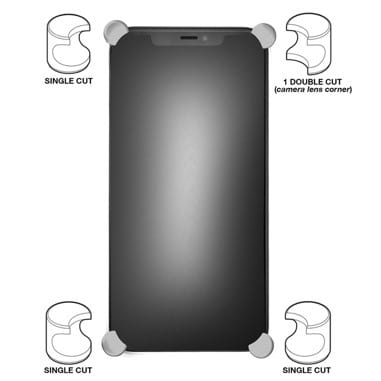
- 1 Corner engineered with a “cut out” to accommodate the iPhone camera lens
- 3 Corners identical without cutaway
- 2 sets of 4 C4 custom 3M adhesives
- Alcohol cleaning pad
- Single use 3M primer ampule
- Wooden trimming tool
Installation with “NEW” 3M Primer
3M Primer 94 is a pre-treat that will activate the adhesive properties of C4 application tape
- Start by setting your phone, adhesives, primer, and screen wipe on top of a protective sheet of paper or paper bag
- Thoroughlyclean the corners of your phone with the enclosed isopropyl alcohol screen cleaner and make sure to wipe dry any visible residue dry.
- Primer – Squeeze the Primer at the “black dot” to break the seal and press down the sponge applicator against the paper until you see liquid flowing.
- Apply primer to the 4 corners (top/bottom glass and edges) of your phone and set aside.
- 2nd apply the primer to the inside of each Corners4…top, bottom, center back
- Next apply adhesives to each corner of your iPhone…Press down hard on the adhesive tape to make sure the tape is bonding firmly to the surface of the phone. Gently remove the white protective paper before applying each Corner.
- Now install the Corners4…*note: There are 3 Corners included that have a single cut to accommodate the edge to edge front screen of your iPhone 11 and one double cut for the camera lens corner.
When you get each Corner in place make sure you push it as far forward as possible and apply firm pressure Corner to phone for 30 seconds. You want to make certain the inside back wall of the Corner is making contact with the corner edge of your iPhone.We’ve also included a wooden tool to help you remove any excess adhesive.
It takes about 24 hrs. for the adhesive to reach full adhesion; so just take care for the 1st day not to pull or snag the Corners…